
Maternity and Infant Care (MIC) database
Our MIC database is a world leading resource for midwifery information and knowledge, and the world’s largest midwifery-specific research database.
What’s included in the database?
The database contains over 300,000 research abstracts, collated from over 150 international journals and publications. We index paper and electronic resources from government, academic and professional sources, to ensure that our database is comprehensive.
All resources are indexed by our librarians, so each record has full bibliographic information, an abstract and, where available, full text access. We make finding maternity research accessible and easy, to support maternity practice, professional development, and academic research.
Within the database, users can filter by author, title, topic or keywords, ensuring that your search can be as broad or specific as you want. Our librarians are always happy to help you with searching, and we can even conduct literature searches for you. Visit our Products, Services & Student Support page to learn more about this offer.
Full journal list
Download the full list of journals that we scan to include on our MIC database.
Search Packs
We collate records into topic-based Search Packs, giving you quick and easy access to everything we have on specific subjects.
MIDIRS Midwifery Digest
We index all editions of the MIDIRS Midwifery Digest onto our database. With a MIDIRS subscription, you have full access to all of these articles
MIDIRS Subscribers
If you’re a current subscriber, you can access the MIC database through your MIDIRS Membership Portal.
Having trouble accessing or using the database? Read our FAQs tab, or contact us.
Non-Subscribers
RCM members get 20% off your MIDIRS subscription. Contact RCM Connect to take advantage of this offer.
If you aren’t an RCM member, you can access the database by subscribing through our join form.
Institutes
Institutes, including libraries and universities, can also subscribe to the database, giving your members access to MIDIRS’ resources.
Please contact sales@wolterskluwer.com for information on annual subscriptions and payment options.
Using the database
If you’re new to using databases, watch our video below to learn how to get the most out of your searching.
Looking to find out about the latest research available? View our Latest Research Update by heading to your My MIDIRS portal.
We collate records into topic-based Search Packs, giving you quick and easy access to research on specific subjects. We provide access to over 550 pre-prepared Search Packs within your MIDIRS subscription. Non-subscribers can also purchase Search Packs for a small fee.
Logging in to the MIC
Updated video of logging into the new website MIC.
Searching within the MIC
Updated video of searching within the new website MIC.
Downloading a Search Pack
Updated video of downloading a Search Pack.
Frequently asked questions
I'm a joint member with the RCM - how can I log in?
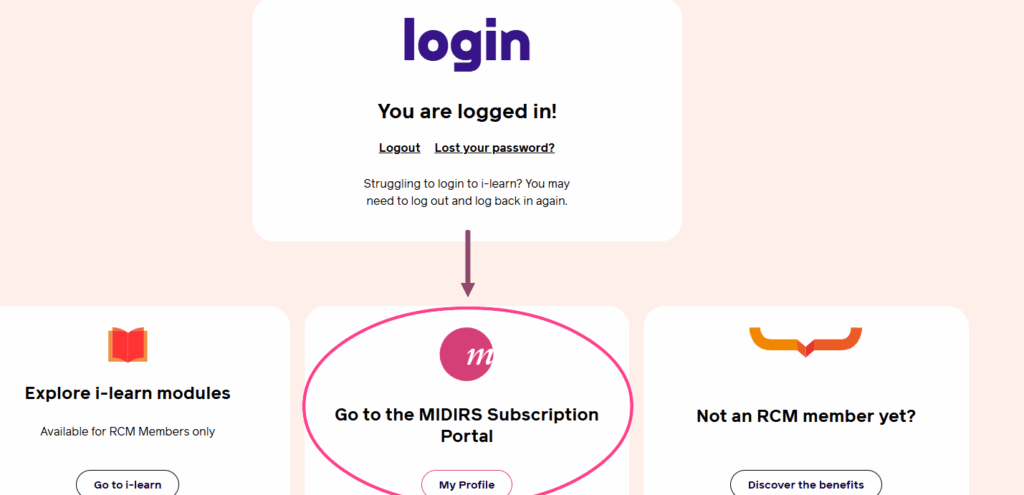
Your login details for the RCM are the same details for MIDIRS. Please log in to your RCM account on the RCM website, then scroll down to access your My MIDIRS portal.
See below for location of the MIDIRS portal on your RCM account:
Why can’t I see the full article?
Unfortunately, the costs of offering full text access to articles that aren’t already freely available online are prohibitive. We would rather offer midwifery’s most comprehensive bibliographic database for the best price.
How can I find full articles online?
How can I find full articles online.
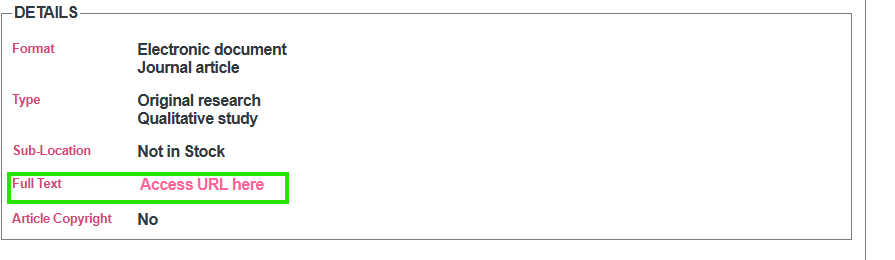
Some articles on the database are freely available online. If this is the case, we will indicate this in the article details where you should see a link to ‘Access URL Here’.
How can I access Search Packs?
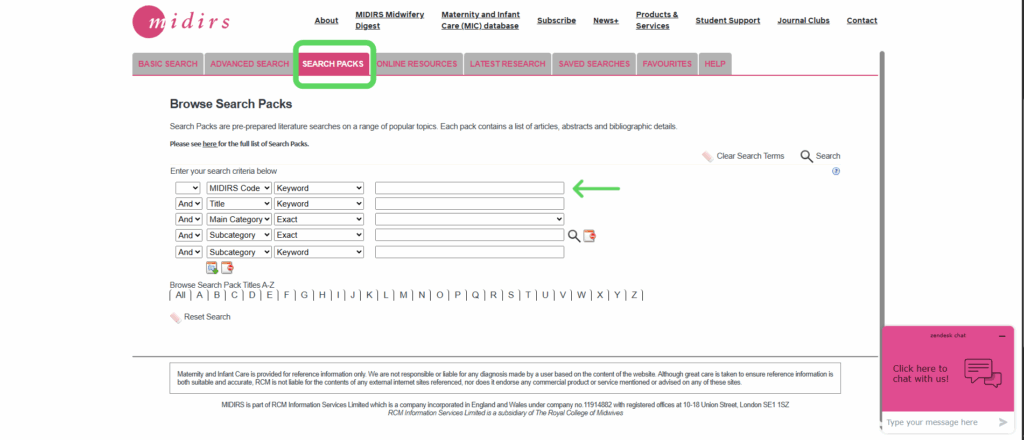
For the best experience with our Search Packs, use our Search Pack Brochure to identify the Pack that you want.
Once you know the Search Pack code (the short letter and number combination to the left of the Search Pack in the brochure), type it into the database as directed by the image below to find the Search Pack.
Why am I not getting any results?
Your search parameters may be a little too restrictive. Start with some key words and narrow down as you go.
Why won't the MIC database work with my browser?
Some browsers work better with the MIC database than others. Try using Google Chrome for the best experience with the database, but other browsers also work. Safari should be avoided for best user experience.